Backtesting a Strategy
Backtesting replays your strategy against historical market data before you deploy it to a live exchange. In the Strategy Builder that work lives in one place, the Backtesting Suite: it runs the replay, holds the trades and performance, and carries the validation checks that tell you how much weight the number can bear.
How it works
When you run the Backtesting Suite, the Strategy Builder:
- Takes the current strategy graph from the canvas
- Freezes an evaluation plan: the history window, the starting equity, the trading costs, and the data requirements the run will use
- Fetches historical price and indicator data for that window
- Replays the strategy through that data, simulating fills at historical prices
- Places an Evidence Card node on the canvas next to your strategy, carrying the result
Backtesting is good for validating logic and comparing setups, but it cannot fully reproduce live execution. The limitations section below covers what it cannot reproduce.
A backtest shows how your logic would have behaved under past conditions. It never guarantees future results, so treat a strong backtest as a reason to test further rather than a reason to size up.
Running a backtest
Load your strategy
Build or load your strategy on the canvas.
Click Backtesting Suite
The Backtesting Suite button sits in the floating toolbar. It is a split button: the left half runs the suite, and the chevron on the right opens Run history and Import backtest report.
Wait for the replay
While the run is in flight, the same button becomes Cancel backtest. Click it to stop the run.
Read the result
An Evidence Card node lands on the canvas with the headline numbers. Click Open Evidence on that card to open the Backtesting Suite over the canvas for the full read.
The button is unavailable on an empty canvas, and while you are viewing an already-deployed strategy in read-only mode. If the run cannot resolve a valid evaluation plan, the suite opens on the Evaluation parameters editor instead of starting, and tells you what needs attention.
Cancelling a run
A backtest over a long window across several markets takes time. Two places stop it:
- Cancel backtest in the floating toolbar, which replaces the primary button while a run is in flight.
- The same action inside the suite while the activity banner is showing.
A cancelled run produces no durable evidence. The suite records the cancellation and offers a retry of the exact frozen configuration, so you are not rebuilding the setup by hand.
Where the results appear
One run produces two surfaces, and they carry the same result at different depths.
The Evidence Card node on the canvas is the compact record: return, win rate, and max drawdown, plus a set of evidence routes: Replay, Data quality, Perp realism, Sensitivity, Out-of-sample, Assumptions, and Raw details. Open Evidence on the card opens the full suite. Each card also carries an Ask Signac action that opens the chat with that card loaded. Change the canvas after a run and the card marks itself Stale, because the evidence no longer describes the strategy in front of you.
The Backtesting Suite pane is the full read. It opens over the canvas and closes with the X in its header. The header line carries the status, the total return, the strategy name, and when the review ran.
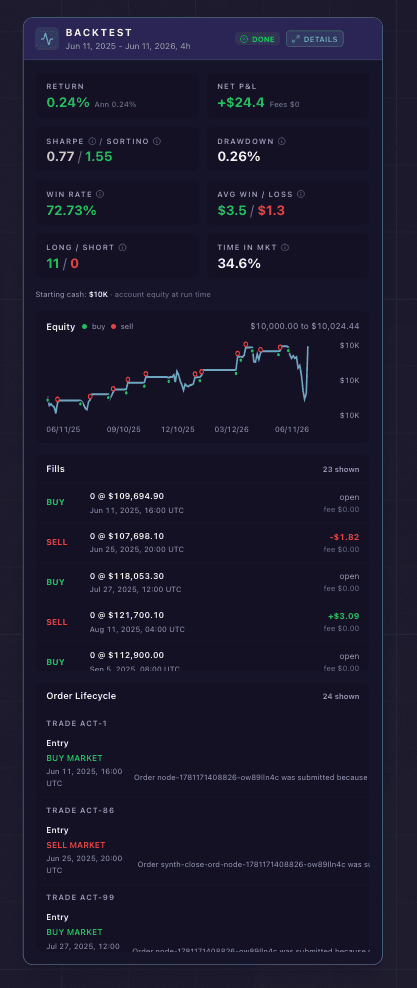
Every simulated fill, the equity curve, and the performance tiles.
Reading the results
The headline
Three metrics sit at the top of the suite: Total return, Win rate, and Max drawdown. Above them is a status label that reads how far the evidence goes, not how good the return was:
| Status | What it means |
|---|---|
| Replay only | The replay is available. The other checks have not all been reviewed |
| Incomplete | Required evidence is missing, or the replay did not complete |
| Cost sensitive | Replay assumptions or missing market data can materially affect the result |
| Fragile | The evidence has material caveats, or a check returned adverse evidence |
| OOS supported | Replay, sensitivity, and out-of-sample evidence are all available |
| Stale | The reviewed canvas has changed since the run |
A high return with a replay only status is one number from one window, which is a place to start rather than a case you can act on.
The review journey
The suite lays out one evidence path in three stages: Historical replay, Compare parameters, Historical validation. It names the next action at each stage, so the sequence is visible rather than something you have to remember.
Replay details
Open Replay details from the Historical replay row for the fill-by-fill read. It shows a set of metric tiles:
| Metric | What it means |
|---|---|
| Return | Total percentage gain or loss across all simulated trades, with the annualized figure beneath it |
| Net P&L | Profit or loss in USD, with fees paid shown beneath it |
| Sharpe | Risk-adjusted return. Above 1 is generally considered good |
| Sortino | Like Sharpe, but only the downside (harmful) volatility counts against it. Higher is better |
| Drawdown | Largest peak-to-trough decline during the backtest period |
| Win Rate | Percentage of trades that were profitable |
| Avg Win / Loss | The average winning trade against the average losing trade |
| Long / Short | How many trades were long versus short |
| Time in Mkt | The share of the period the strategy held a position |
Below the tiles:
- Starting cash, with its provenance: your account equity at run time, or the default when no account equity was included in the request
- The equity curve, the simulated portfolio value from start to end, with a marker on each trade
- Fills, every simulated trade with side, size, price, fee, realized PnL on closes, and timestamp
- Orders, the order-level view with its own filters
- Terminal exposure, what the strategy was still holding when the window ended: open positions, pending orders, unrealized PnL, and terminal equity
If a section was capped to fit the report, a Replay detail coverage panel says so in plain numbers, in the form “Showing first N of M”. The metrics still cover the whole run. Only the list is trimmed.
Modeling gaps
The suite names missing data and unmodeled behavior one occurrence at a time rather than folding them into a single warning. When a run records something that may have moved the reported return, a qualifier appears next to Total return. It opens the Modeling gaps view, which groups every occurrence by category, states the consequence and the affected scope, and exposes the technical detail behind each one. Where a setting resolves the cause, the group carries a button that takes you straight to that setting. Where none does, it says so rather than leaving you guessing.
Evaluation parameters
What the simulation assumes shapes the answer, so the assumptions are editable and frozen into the run. Open them with Change evaluation parameters under Advanced tools.
Evaluation window. Either Latest history, which reaches back a target number of bars so the calendar span scales with your strategy’s interval, or Specific dates for an explicit range.
Parameter checks. The Later test window sets how long each out-of-sample window is, in days. It defaults to 30.
Starting state. Starting equity sets the simulated account, and defaults to 10,000 in the quote asset. You can also start the replay holding a position rather than flat, with a side, an amount, an entry price, and a margin mode.
Trading costs. Effective taker fee and Conservative market-order slippage assumption, both in percent, seeded from a calibrated exchange cost estimate rather than left at zero. A reset button restores that calibrated estimate after you change them. Turn on Use historical order-book liquidity and the simulation prices market orders against recorded book depth instead of a flat slippage figure.
Data requirements. Require complete perp data refuses to report a result built on incomplete perpetuals data.
Analytics assumptions. Annual risk-free rate feeds the risk-adjusted metrics.
Editing these parameters changes the evaluation, not your strategy. The editor says so plainly: they are frozen evaluation inputs, and account-specific fee tiers, discounts, promotions, and rebates are not inferred. Zero-cost assumptions are an explicit input, not an estimate of free trading.
Saving with Review with these parameters archives the current review before the new one starts, so the old evidence stays intact in Run history.
Historical validation
A replay tells you what happened once. The three checks under Historical validation ask whether it holds:
- Out-of-sample test (fixed parameters, later windows)
- Walk-forward analysis (re-optimize, then test the next window)
- Backtest overfitting risk (CSCV and PBO)
Each check states the question it answers, the method behind it, the exact test conditions, and the result. Optimize a Strategy covers what each check measures and how to read it.
Run history
Every completed review is archived on this device. Open Run history from the chevron on the Backtesting Suite button, or from Advanced tools inside the suite.
- Each row shows the review’s status, the strategy name, and when it was archived. Click it to reopen the review in inspection mode.
- Keep pins a review so automatic cleanup leaves it alone. It is not a backup and it does not sync across devices.
- Export kept reviews writes them out. Clean up now reclaims storage.
- Select two or more reviews and click Compare.
Compare reviews puts the runs side by side, oldest to newest, and marks the rows that changed. The setup table compares Markets, Entry logic, Order setup, Cycle, Backtest period, Trading costs, and Trades. Below it, Backtest performance compares the historical results, and Validation comparison compares how the checks landed. This is how you tell a genuine improvement from a different window.
Run history lives in this browser. Clearing site data clears it. Export anything you want to keep.
Import a backtest report
Import backtest report, in the same chevron menu, opens a local import panel. Opening the panel reads nothing and starts nothing. Choose one local JSON report and it loads as an imported review, badged as imported, which you can inspect and compare against your own runs the same way.
Limitations
Backtests simulate fills at historical prices. They apply the trading-cost assumptions frozen into the run and report the resulting cost, but they cannot reproduce live latency or market impact. A backtest assumes your order fills at a historical candle. A live order competes for real liquidity at that moment.
Historical indicator values are computed from historical data, not live feeds. This is usually accurate but can differ slightly from real-time computation during fast markets.
The review describes the canvas it ran on. Edit the strategy afterwards and the Evidence Card marks itself stale, because those numbers belong to an older version of the logic. Run a fresh review before you add evidence on top of it.
Tips
Run the Backtesting Suite before deploying any new strategy. It catches logical errors a glance at the canvas misses, like impossible conditions or a misconfigured cycle. Configure your stop loss and take profit first, so the simulation includes the risk management that will run live.
Compare results across different windows, then use Compare reviews to read them side by side. A setup that thrives in a trend can bleed in a chop, and the comparison table shows you which rows actually moved.
Set realistic trading costs before you trust a number you would size on. A frictionless run flatters the logic.
Next steps
Once the replay looks good, do not size up on that one number. Compare parameter sets and run the validation checks so a strong backtest is a number you can trust rather than one you tuned your way into.
When the logic survives that, deploying to live markets is the next step. After it has run for a while and built a real record, you can share the result as a card with the strategy’s stats on it.