Deploy a Strategy
Deploying takes a strategy off the canvas and puts it to work: it runs on its own, reading the market and placing orders against your Hyperliquid balance inside the limits you set. This page covers what to check before you deploy, what happens during deployment, and how to manage the strategy once it is live.
Synchronicity is live on Hyperliquid mainnet, so a deployed strategy trades real funds from the first order. Real money is on the line, including liquidation on a leveraged position. Backtest the logic and start small. To rehearse the same deploy flow risk-free first, see Practice on Testnet.
Before you deploy
Run this checklist before you deploy:
- Your strategy is backed up.
- All nodes are connected. Unconnected nodes are flagged during validation.
- All required fields are filled in: market, order type, size, and any exit conditions.
- Your wallet is connected. The Deploy button shows a connect prompt if it is not.
- You have backtested your strategy to verify its logic before you deploy.
- You understand how leverage affects margin and liquidation on a live position. See Leverage, Margin, and Liquidation.
- You understand the notional limit each strategy runs under at mainnet launch. See The notional limit below.
Warnings and blockers
Beyond your own checklist, the builder checks the strategy against your live account and reports what it finds in the deploy flow:
- Order below the exchange minimum (blocks deploy). Hyperliquid rejects any order worth less than $10. If an Order node’s value comes in under that, validation reports it as an error and the deploy is blocked until you raise the size.
- Another strategy trades the same asset. If another live strategy on your account trades the same asset, the builder points it out. Your account holds one net position per asset on Hyperliquid, so trades from either strategy move the same position. See Using Multiple Assets for how multi-market flows and shared positions behave.
- Opening demand may exceed available margin. The builder estimates the worst case where the opening orders of every live strategy fire at once. When that combined demand approaches or exceeds your available margin, it warns you that later orders may fail from insufficient margin. This warning does not block the deploy. It is there so a failed order later does not take you by surprise.
The notional limit
At mainnet launch, every strategy runs under a notional cap of $25,000. It is worth understanding exactly what that number counts, because it is not what most people assume.
The cap is on the total change in position magnitude a strategy creates, not on how large a position is open at any one moment. Every time the strategy moves its position size (opening, adding to it, or cycling into a new one) that movement counts against the $25,000. Closing a position does not give the room back, and it makes no difference whether the position closes before the next cycle begins. The budget tracks how much notional the strategy has put through the market in total, not how much it holds right now.
The limit counts turnover, not open exposure. A strategy that opens a $5,000 position each cycle reaches the $25,000 cap after five cycles, even if every position is fully closed before the next one opens. Its active exposure never exceeds $5,000, but the notional it has moved adds up to $25,000.
Plan sizing with this in mind. A strategy that trades often, even in small size, spends the budget through turnover rather than through holding one large position. Fewer, larger cycles and more frequent, smaller ones can reach the same cap.
The deploy process
Click Deploy
Click Deploy in the floating toolbar.
Review the details
A confirmation modal appears. Review the strategy name (pre-filled from your last save) and edit it if needed. Add an optional description. The modal also shows the strategy’s failure settings, inherited from your account default unless you change them here.
Submit
Click Deploy to submit.
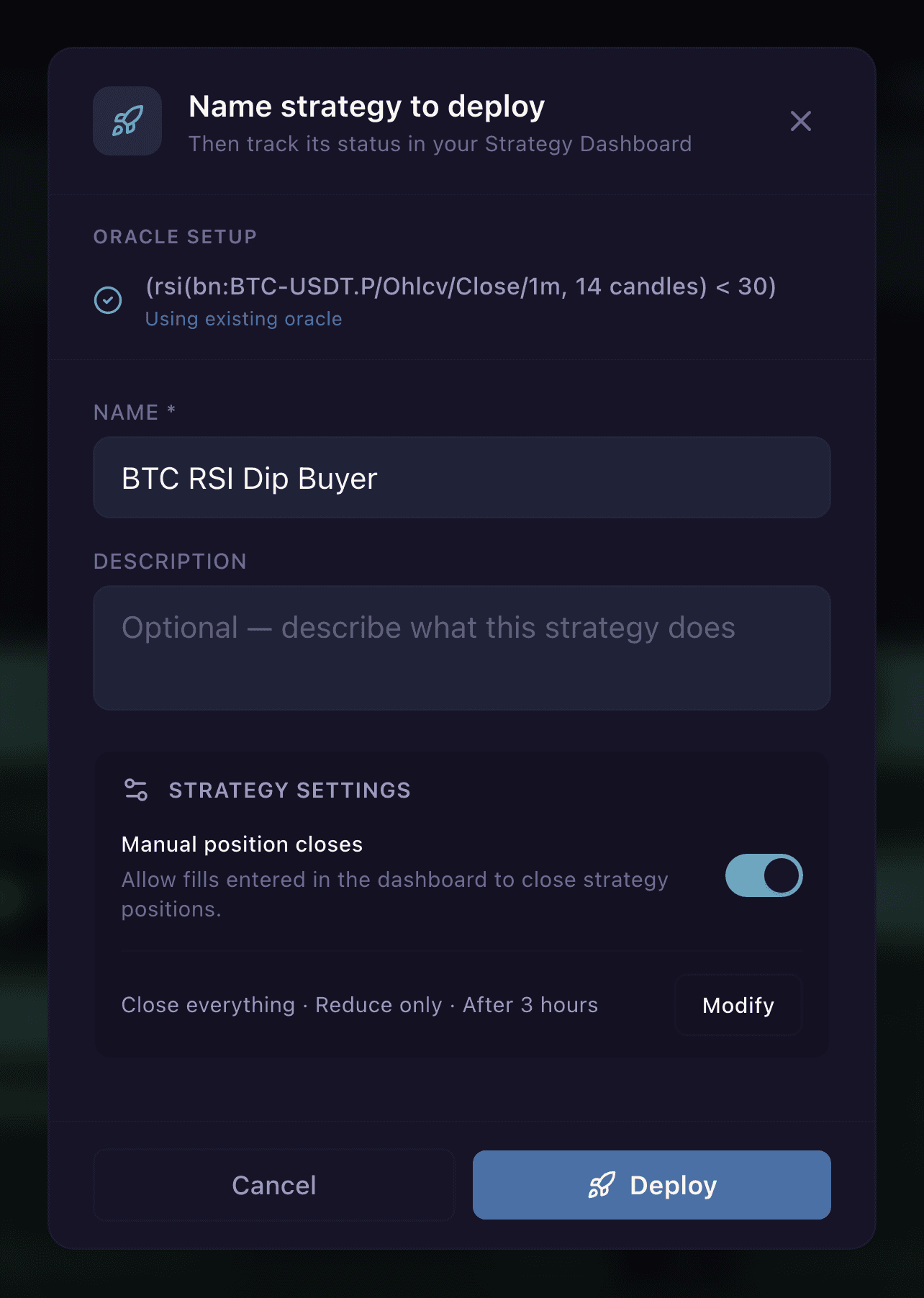
The confirmation dialog. Name the strategy, review the oracle and Strategy settings, then Deploy.
The builder runs validation before sending anything. If it finds configuration errors, they appear in the modal with a description of what needs fixing.
Once validation passes, the builder sets up any required oracles first. An oracle is the trusted live data source that feeds a value (such as a price or an indicator reading) to your running strategy. A progress indicator shows each oracle’s status as it registers. See Oracles for how the oracle system decides whether a condition is true, and what happens when its data is missing or stale.
What happens during oracle deployment:
- Each Indicator condition and inline trigger gets its own oracle
- Oracles start in WarmingUp state while they connect to market data feeds and compute initial values
- Once an oracle has its first value, it moves to On and is ready to push to chain
- When all oracles are On, the builder proceeds to the on-chain deployment step
After the oracles are ready, the builder submits the strategy under your signed-in session. The sign-in signature you gave when connecting your wallet is what authorizes it, so there is no extra wallet prompt at deploy time. Once Synchronicity’s execution engine accepts the strategy, it goes live.
Failure settings
A live strategy depends on Synchronicity reaching Hyperliquid. When you deploy, you choose in advance what happens to the strategy’s positions and orders if execution fails, whether from a service outage that lasts too long or from a breaking error in the strategy itself. The deploy modal shows your current policy under Strategy settings. Click Modify to change it.
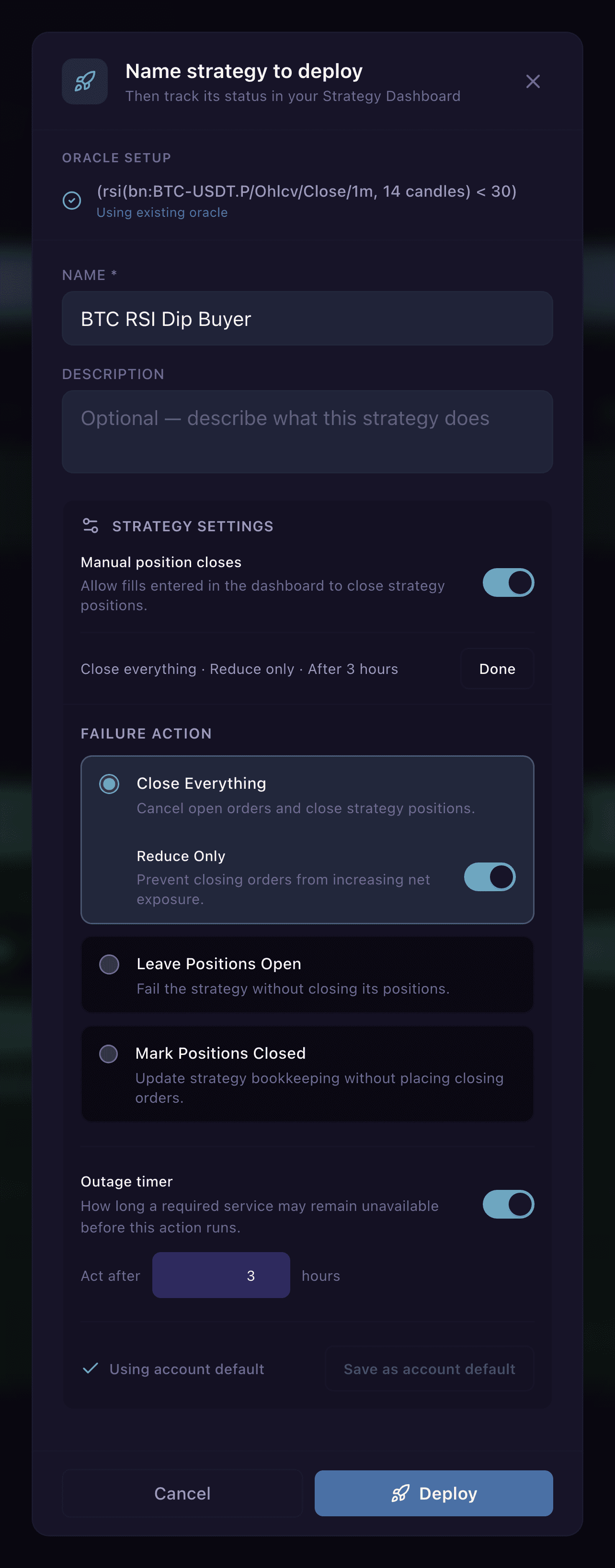
The Strategy settings editor, expanded via Modify: manual position closes, the failure action, and the outage timer.
Failure action. Three options:
- Close Everything (the default). Cancels the strategy’s open orders and closes its positions. A Reduce Only toggle, on by default, restricts the closing orders so they can only shrink the position, never grow or flip it.
- Leave Positions Open. The strategy fails but its positions stay open on the exchange, and managing them passes to you. You choose what happens to resting orders: Cancel Orders (the default for this option) or Leave Orders Open.
- Mark Positions Closed. Updates the strategy’s own bookkeeping only. No closing orders are sent and nothing changes at the exchange. Pick this only when you are handling the position yourself.
For the full explanation of what each option does to the exposure a strategy holds, see Strategy Positions.
Outage timer. Sets how long a required service may stay unreachable before the failure action runs, 3 hours by default. Switch the timer off and an outage alone never triggers the action, though a breaking strategy error still runs the failure action you chose.
Account default. Your policy can travel with your account. Save as account default stores the current choice so every future deploy starts from it, and Reset to account default returns the editor to the stored policy. Changing the settings for a single deploy without saving overrides the default for that strategy only.
During an outage, the strategy dashboard shows a banner with the outage duration and how many strategies are affected. See Monitor a Live Strategy for how to read it.
After deployment
Once your strategy is accepted, it appears in the strategy dashboard on the left with a status of Active.
From there:
- The strategy runs continuously, evaluating its conditions and acting when they are met.
- You can monitor progress and open positions from the dashboard.
- You can click into the strategy to view it in read-only mode on the canvas.
Redeploying a strategy
To update a deployed strategy, cancel it first, make your changes, then deploy again. There is no in-place edit for active strategies. See Cancel or Stop a Strategy for how to stop a running strategy before redeploying.
Cancelling a strategy stops its flow and then prompts you to choose what happens to any open strategy positions: close them, mark them closed, or leave them open. When you cancel to redeploy, decide whether to close the position or carry the exposure yourself. See Cancel or Stop a Strategy.
Troubleshooting deployment
“Indicator has no conditions configured or has not been deployed”: Open the flagged Indicator node, add at least one condition, and try deploying again.
Deploy button is disabled: The canvas has no nodes, you are viewing a deployed strategy in read-only mode, or deploying is restricted in your region. Add at least one Indicator node and one Order node, and open the strategy in edit mode. If your wallet is not connected, the toolbar shows a Log In button in place of Deploy, so connect it first.