Strategy Positions
When one of your strategies trades, Synchronicity tracks what it bought or sold as a strategy position: exposure that belongs to that strategy. This page explains how strategy positions work and what happens to them when you close them, cancel the strategy, or the strategy fails.
The short version
On the exchange, your account has one account position per market. Synchronicity tracks which strategy owns which part of that exposure, as strategy positions.
A strategy position opens when one of the strategy’s orders fills, and it closes when its size returns to zero.
It doesn’t always get to close on its own. You might want to exit out of a strategy position early, you might cancel the strategy, or the strategy might fail. All three lead to the same question: what should happen to the strategy position that is still open? And the answer is always one of the same three: close it on the exchange, mark it as closed in the strategy engine ledger only, or leave it open. A strategy is complete only when nothing is left running: no actions, no orders, and no open strategy positions.
The rest of this page walks through each part in detail, following one example throughout: you’ve bought 0.5 BTC yourself, and your strategy, call it Momentum, is about to buy another 0.5 BTC.
Terminology
These terms come back throughout the page:
strategy position: The part of your exposure that one specific strategy owns, tracked in the strategy engine ledger.account position: The net position your exchange account holds in a market, regardless of who opened it.strategy engine ledger: Synchronicity’s internal record of strategy positions and their history.fill: An executed trade. Fills are what create, grow, shrink, and close positions.open: A strategy position with nonzero size andactive = trueclosed: A strategy position that no longer counts as open exposure. Its PnL, fees, and history are kept.close order: An order sent to the exchange to reduce or close a strategy position.mark as closed: Closing a strategy position in the ledger only, without sending any exchange order.snapshot: The exchange’s report of what your account really holds, pulled every 5 minutes.
These distinctions do most of their work once you are running more than one strategy, because several strategies drawing on one shared balance is the normal case here rather than the exception.
How is a strategy position different from your account position?
Your exchange account has one net position per market. When Momentum buys its 0.5 BTC on top of the 0.5 BTC you bought yourself, the exchange sees one combined account position of 1.0 BTC, not two separate ones. The half you bought yourself came from manual trades on the same Hyperliquid account, which sit beside your strategy exposure rather than inside it.
Synchronicity’s strategy engine keeps its own ledger on top of that. Each strategy tracks the exposure it owns: what it opened, at what cost, with what fees and profit. So the same holdings look like this:
Account position (exchange):  1.0 BTC long
├── Momentum strategy position:   0.5 BTC
└── Yours (manual, no strategy):  0.5 BTC
The engine keeps the two views in sync (see “How does the strategy engine ledger stay in sync?” below), but they can be handled separately: a strategy position can close on the exchange, or in the strategy engine ledger only.
When does a strategy position open and close?
A strategy position starts with a fill, not with an order:
- Momentum places an order for 0.5 BTC. No strategy position exists yet.
- The order fills, fully or partly. Say 0.2 BTC fills first: Momentum now has a 0.2 BTC strategy position. When the remaining 0.3 BTC fills, it grows to 0.5.
- Every later fill updates the strategy position. Fills in the same direction grow it, fills in the opposite direction shrink it and lock in profit or loss.
- When a fill brings the size back to zero, the strategy position closes on its own. If Momentum bought at $100,000 and sells its 0.5 BTC at $110,000 the strategy position closes with $5,000 realized PnL.
For every strategy position, the strategy engine ledger tracks its size (positive is long, negative is short), what the open exposure cost to build, and the realized PnL and fees collected along the way. Closed strategy positions keep all of that plus their full history, so you can always review what happened. While the strategy runs you can watch a position open and close from the dashboard.
If the engine has no reliable price for a change, it records the price as missing instead of guessing at your PnL.
What are the three ways a strategy position can close?
You might want to exit out of a strategy position early. You might cancel a running strategy while it still holds one. Or the strategy might fail. All three lead to the same question: what should happen to the strategy position that is still open? There are always the same three answers:
| Option | What happens on the exchange | What happens in the ledger | Can the strategy complete? |
|---|---|---|---|
| Close positions | Close orders are sent and the strategy position is traded down to zero | Final PnL, fees, and history are recorded | Yes |
| Mark as closed | Nothing: your account position stays as it is | The strategy position is closed: the exposure is now yours to manage | Yes |
| Leave position open | Nothing | The strategy position stays open and keeps being tracked | No, not until the strategy position closes some other way |
In the example, Momentum holds 0.5 BTC and you want to exit. Each option does something different:
- Close positions. The engine sends close orders to the exchange. Momentum sells its 0.5 BTC, the strategy position goes to zero, and the final PnL and fees are recorded. Your account position drops from 1.0 to 0.5 BTC (your own half is untouched). There is an important edge case here: your account position can be smaller than the strategy position. For example because you already sold part of it yourself. The close order is sized to the strategy position, so without reduce-only it can push your account position past zero and flip your exposure to the other side. Turning on reduce-only helps prevent this situation. It guarantees the close order can only shrink your account position instead of growing it. The engine then closes what it can on the exchange and marks the rest as closed in the ledger. Reduce-only has its own failure mode on a shared account, and a reduce-only close that the exchange rejects is covered in troubleshooting.
- Mark as closed. No orders are sent. Momentum’s strategy position is closed in the ledger only, and your account position stays at 1.0 BTC. The 0.5 BTC that belonged to Momentum is now simply yours, outside any strategy. Momentum’s unrealized PnL closes out at that moment. The strategy position is valued at the current mark price and the end result is recorded as the strategy’s PnL. Any price movement after that belongs to you, not to the Momentum strategy. Use this when you want to keep the exposure or manage it yourself.
- Leave position open. Nothing changes. Momentum keeps its 0.5 BTC on the ledger, and the strategy cannot complete until that strategy position closes some other way.
How do you close a strategy position manually?
The Strategy Position Table lists your strategy positions. You can find it in two places: on the strategy canvas (bottom left) and on the strategy dashboard under the Position tab.

The Positions table on the dashboard: a live BTC-USDC long, with Close All, Market, and Limit.
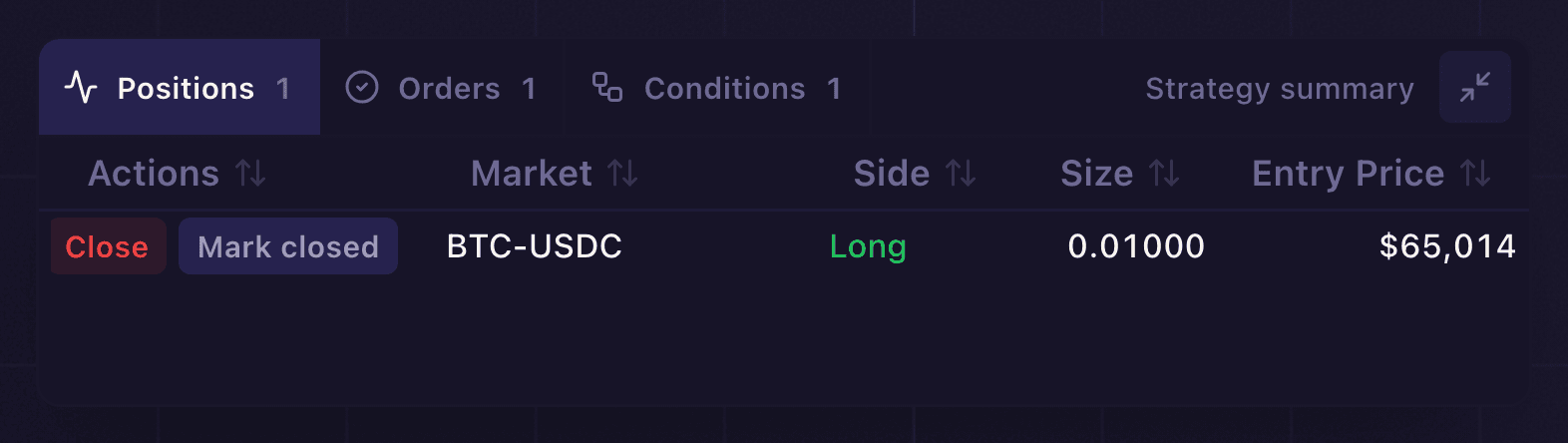
The same table on the canvas (bottom left), with Positions, Orders, and Conditions tabs.
From there you have two direct options:
- Close. Submits a close order to the exchange, with the same optional reduce-only protection described above.
- Mark as closed. Closes the strategy position in the strategy engine ledger without touching the exchange.
There is also an indirect way: manual mode. Manual mode is a per-strategy setting that lets your own trading close that strategy’s positions. With it on, when you place an order yourself that reduces your account position, the engine credits the reduction to the strategy’s open strategy positions in the same account and market. In the example: with manual mode on for Momentum, selling 0.3 BTC yourself shrinks Momentum’s strategy position from 0.5 to 0.2, and the profit or loss on that 0.3 is recorded against Momentum.
Manual mode is on by default for strategies that don’t place their own close orders, and off by default for strategies whose plan already closes its own strategy positions. You can turn it on or off yourself on the Deploy confirmation screen when you deploy a strategy. If more than one strategy position qualifies for a reduction, the oldest strategy position is reduced first by default. The account can be set to split reductions proportionally instead.
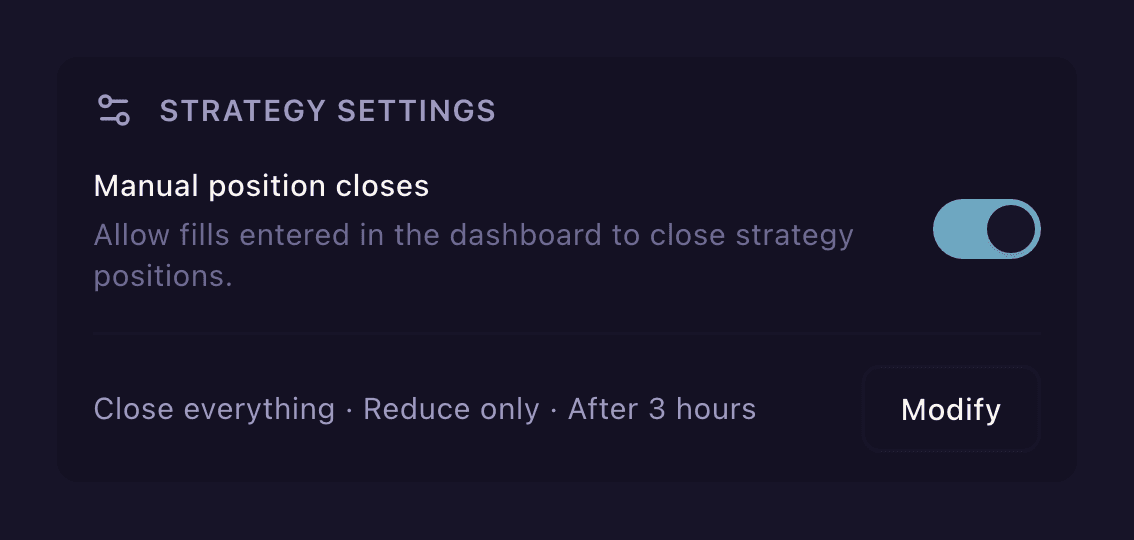
Manual mode is the “Manual position closes” toggle under Strategy settings when you deploy.
What closed this trade?
Every fill a strategy books lands as a row in the Trades tab of the strategy panel, alongside Positions, Orders, Actions, and Oracles. The Type column names what produced that fill, so a close does not have to be reconstructed from timestamps and prices.
| Type | What it means |
|---|---|
| Order fill | An exchange fill attributed to this strategy. The ordinary case. |
| Take profit | The take-profit order attached to the entry filled and closed the position. |
| Stop loss | The stop-loss order attached to the entry filled and closed the position. |
| Manual order close | An order you created yourself closed the strategy position. |
| Marked closed | The strategy position was reconciled in the strategy engine ledger. No exchange order was created. |
Take profit and Stop loss appear only on strategies whose Order node carried an exit target, which Set Order Conditions covers. The engine submits those exits as child orders of the entry and records the role each one holds, then matches the fill back to that role. If one order identity is claimed by two roles, the row falls back to Order fill rather than guess, because a stop-out labelled as a take profit is worse than no label at all.
Read the two labels as a scoreboard. A run of Take profit rows means the plan worked as written. A run of Stop loss rows means the protective side is carrying the strategy, which is a verdict on the entry rather than on the stop.
How do orders change strategy positions?
Every order that belongs to a strategy carries a setting called a position effect, which controls how its fills are allowed to change the strategy position:
normal: the default for ordinary strategy orders. Fills can increase, decrease, or reverse the strategy position.reduce_only: sends the order to the exchange withreduce_only = true, so the exchange itself guarantees the order can only shrink your account position.close_strategy_position: used by explicit close orders, placed as market orders. The order size is capped to the strategy position size. By default it does not carry the exchange’s reduce-only flag, so it is allowed to grow or flip the account position if closing the strategy’s exposure requires it. Turning on reduce-only during a close adds that flag.
The orders themselves come from what you configured on the canvas, including the exit settings inside the Order node where take profit, stop loss, and any condition-based close live.
What happens when you cancel a strategy?
When you cancel a strategy, the engine cancels its active actions and open orders. Then it asks you what to do with any open strategy positions, using the same three options: Close positions, Mark as closed, or Leave position open.
What happens when a strategy fails?
A strategy fails in one of two ways:
- It hits a terminal error: a problem it cannot recover from. This fails the strategy immediately.
- One of its actions stays stuck for too long. If a service the strategy depends on goes down, the affected actions don’t fail right away, they become degraded or pending and wait for the situation to be resolved. How long the strategy is allowed to wait is a limit you set when creating the strategy. If an action stays stuck longer than your limit, the strategy fails.
A failure always applies to the whole strategy. If Momentum has two independent branches and only one hits a terminal error, both fail together.
What happens to the failed strategy’s open strategy positions is also something you chose when creating it, from the same three options as always: Close positions, Mark as closed, or Leave position open. If you chose Leave position open, one extra setting decides whether the strategy’s open orders are also left open or canceled.
One caveat on Close positions: it needs the engine to still be able to place orders. If it can’t, for example because approval for the Hyperliquid agent was revoked, the engine records the failed close attempt and keeps the strategy positions active until order placement is restored or you resolve them manually. Mark as closed doesn’t need the exchange, so it always goes through.
What happens if the account position is liquidated?
If the exchange liquidates your account position, the affected strategy positions are closed automatically. In the example, a liquidation of the 1.0 BTC account position closes Momentum’s 0.5 BTC strategy position with it. The strategy engine ledger records the liquidation as the source, along with the liquidation or mark price when available, realized PnL, and fees.
Liquidation is an external event, not a strategy decision. How liquidation works on Hyperliquid is decided by the exchange, not by Synchronicity. If a close order or close condition was still waiting when the liquidation hit, it stops waiting once the strategy position is marked closed.
How does the strategy engine ledger stay in sync?
The engine keeps strategy positions matched to what your account actually holds. In normal operation the strategy engine ledger never drifts, because every fill is recorded as it happens. As a backup, the engine also pulls a snapshot of your real account positions every 5 minutes and reconciles the ledger against it, so if the two views ever do fall out of sync, the difference is corrected within minutes. Suppose you manually sold 0.8 of the 1.0 BTC directly on the exchange: the account position is now 0.2 BTC, less than Momentum’s 0.5 BTC strategy position, so the ledger adjusts. The rules:
- If your account has no matching account position, the affected strategy positions are reduced to zero and closed.
- If your account holds only the opposite side, the same happens before the opposite exposure is treated separately.
- If the combined exposure of your strategies is larger than your account position, strategy positions are reduced until the totals match. In the example, Momentum’s strategy position is reduced to 0.2 BTC.
- If several strategies share one account position, reductions are split proportionally unless a specific fill identifies which strategy the change belongs to. Every adjustment is recorded in the strategy position’s history.
Reconciliation only ever reduces or corrects strategy positions. It never creates new exposure.
When is a strategy complete?
A strategy is complete only when all of the following are true:
- There are no active actions.
- There are no open orders.
- There are no pending close or cancel requests that could still affect the strategy.
- There are no open strategy positions.
Closed strategy positions stay available for history, PnL, and fee review. They never block completion.